Pixlr AI Photo & Video Editor
Photography · Pixlr Pte Ltd

Pixlr AI Photo & Video Editor screenshots




Pixlr AI Photo & Video Editor has been on Android since November 2012, back when it was called Pixlr Express, and it has picked up more than 100 million installs in that time. What stands out in the current version is how much it tries to cover: AI-assisted editing, collages, retouching, templates and a large library of effects all in one app. That breadth is the pitch, and it is also the thing to weigh before you install it.
The app is free, carries ads and offers in-app purchases. Its average rating sits at 3.4 from roughly 1.2 million ratings. If you want a single place to clean up photos, build collages and try creative effects without learning desktop software, this is built for you. If you already have a workflow you like, the appeal is more about convenience than necessity.
The AI tools that do the heavy lifting
The headline features are the AI ones. Generative Fill lets you highlight an area of a photo and have the app's generator place objects into that space. Remove Object takes something out of the frame and fills the gap, and Remove Background cuts a subject out of its surroundings. These three cover the tasks people most often want help with: getting rid of a distraction, swapping what sits behind a subject, or adding something that was not there when the shot was taken.
Background removal is described as pixel-perfect, which is the kind of claim I take as marketing until I see the result on a tricky edge. The same goes for the fill tools: how well they blend depends on the photo, and a busy background is always harder than a plain one. The value here is that these jobs, which used to mean careful manual masking, are handled by the app instead.
Everyday editing and retouching
Away from the AI features, the app covers the standard ground well. Auto Fix adjusts color in one tap, which is the fastest route to a photo that looks reasonable without fiddling. Crop and resize let you set dimensions before saving, and a Favorites button keeps track of effects and overlays you return to, so you are not scrolling through the catalog each time.
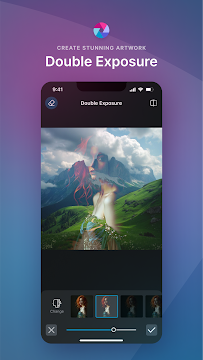
Portrait work gets its own set of tools: blemish removal, red-eye correction, skin smoothing and teeth whitening. Color Splash keeps one color and drains the rest, while Focal Blur adds depth by blurring parts of the frame. Stylize effects turn a photo into a pencil sketch, a poster or a watercolor, and Double Exposure combines images using layers and adjustable transparency. Text tools add captions with a choice of fonts, and borders finish the composition. Individually none of these is unusual, but having them together means fewer trips to other apps.
Collages, templates and the effects library
The app leans heavily into social media output. There are multi-layered templates that the developer refreshes with the seasons, preset collage designs with grid styles, custom ratios and backgrounds, and effect packs, overlays and border packs that are added to over time. The developer puts the number of free combinations of effects, overlays and filters at over 2 million, which is a figure I would treat as a measure of variety rather than a promise that every one will suit your photo.
Overlays adjust tone, letting you warm an image up, cool it down or push it toward something more surreal. Finished work can be shared straight to email, Instagram, Facebook, TikTok or another network. The most recent update added layer management so you can organize, select and reorder multiple layers on a phone, plus more text formatting options. For anyone building posts from several elements, those two changes matter more than another filter pack.
What it costs, and what comes with it
The app is free to download. It contains ads and it offers in-app purchases, so the experience is not entirely without cost or interruption, even though the core editor is available at no charge. I would go in expecting both rather than being surprised by them later.
Treat the free download as the starting point and decide from what you see in the app.
How it compares with the alternatives
There are two broad routes if you are editing photos on a phone. One is a focused tool that does a single job, such as background removal or retouching, and does it without much else in the way. The other is an all-in-one editor like this one, where the AI tools, the collages, the effects and the text options live in the same place. Pixlr clearly belongs to the second group, and that is the trade you are making: more capability in one app, and more surface area to learn.
Against a dedicated desktop editor, the appeal is convenience rather than raw control. Against a single-purpose mobile app, the appeal is not having to switch between several of them. The 3.4 average from a large number of ratings suggests plenty of people find the balance acceptable and a fair number do not, which is typical for an app that tries to cover this much ground.
A broad editor for casual creators
Pixlr AI Photo & Video Editor is worth installing if you want one app that handles cleanup, retouching, collages and creative effects. The AI fill, object removal and background removal cover the tasks that most often send people looking for an editor in the first place, and the layer and text improvements in the latest update make it more usable for anything built from several pieces.
It is not the choice for someone who wants a narrow tool that does one thing precisely, or for anyone bothered by ads in a free app. If you are putting together posts for social media, cleaning up family photos or experimenting with stylized looks, the range on offer here is hard to match in a single download. Try it on a few of your own images first, since results from the AI tools depend on what you feed them.
The short verdict
A wide-ranging free editor with capable AI tools, best for casual creators who don't mind ads.
What's new in version 3.9.3
What's New 🎉 - 🎨 New layer management: Organise, select, reorder and manage multiple layers directly from your mobile device. - ✍️ New text styling tools: Customise text with more formatting and styling options. - 🛠️ Bug fixes and performance improvements for a smoother and more reliable editing experience.
App specs
- Version3.9.3
- UpdatedOctober 2, 2026
- Downloads100M+
- RequiresAndroid 9+
- PriceFree
- Age ratingEveryone
Pixlr AI Photo & Video Editor: frequently asked questions
What can the AI features in Pixlr actually do?
There are three main ones. Generative Fill places objects into an area you highlight, Remove Object deletes something from the frame and fills the gap, and Remove Background cuts a subject out of its surroundings. All three are aimed at the edits people most often want help with.
Does Pixlr cost anything?
The app is free to download, though it contains ads and offers in-app purchases.
Can I make collages and social media posts with it?
Yes. The app includes preset collage designs with grid styles, custom ratios and backgrounds, plus multi-layered templates that the developer updates with the seasons. Finished images can be shared to Instagram, Facebook, TikTok, email or another network.
What retouching tools are included?
You get blemish removal, red-eye correction, skin smoothing and teeth whitening, along with Color Splash for keeping one color and Focal Blur for adding depth. Auto Fix adjusts color in a single tap if you want a quick starting point.
What changed in the most recent update?
The latest version adds layer management, so you can organize, select and reorder multiple layers on your phone. Text styling gained more formatting options, and the release also includes bug fixes and performance improvements.
Pros
- AI fill, object and background removal
- Large free effects and overlay library
- Collage templates with grids and ratios
- Retouch tools for portraits
- Layer management added in latest update
Cons
- Free version contains ads
- Offers in-app purchases
- 3.4 average from over a million ratings
- Breadth means more to learn
Download Pixlr AI Photo & Video Editor
by Pixlr Pte Ltd
Free · In-app purchases · Contains ads · Official store listings


