Speedtest by Ookla
Tools · Ookla

Speedtest by Ookla screenshots

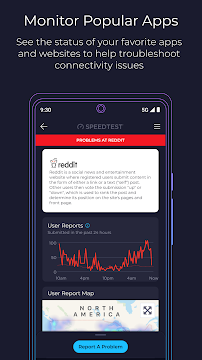


A slow connection is rarely obvious about what is wrong. The video call stutters, a game session lags, the stream drops to a blurry mess, and you are left guessing whether the problem is your router, your carrier or the service you are trying to reach. Speedtest by Ookla is built for that moment of not knowing, and it has become the default way many people answer the question of how fast their connection really is.
Ookla's app sits in the Tools category on Google Play, is free to download and has been installed more than 100 million times, with a 4.6 average from roughly 1.49 million ratings. That kind of reach tells you it has become the reference point people reach for when they want a number attached to their connection.
The speed test itself, and what it measures
The core of the app is the classic speed test: one tap starts a run that reports download speed, upload speed and three separate measures of latency. Those three latency figures matter more than they might sound, because a connection can post a healthy download number and still feel sluggish if the delay between your device and the network is high. The developer describes the test as the most accurate one available, which is the sort of claim every speed tool makes; what is worth noting is the infrastructure behind it, a global server network that the app draws on so a test can be run from most places.
Ookla says 55 billion tests have been run through its service to date, and that volume is the real argument for the app. A speed test is only as useful as the server it talks to, and a network of that scale gives the app somewhere sensible to measure against wherever you happen to be.
In practice I would treat the result as a snapshot rather than a verdict. Run it once and you know what the connection was doing at that minute; run it a few times across a day and you start to see whether a problem is constant or only shows up at certain hours. The app keeps a history of past results, which makes that kind of comparison straightforward, and results can be shared easily if you need to send evidence to an internet provider or a landlord.
Downdetector turns it into an outage tracker
The feature Ookla now leads with is Downdetector, folded into the app so you can see status updates for online apps and services in something close to real time. You can track the services you care about and report a problem when one of them misbehaves. That changes the app from a one-off measurement into something you might check before you start blaming your own equipment.
The logic here is simple and, to my mind, the most useful addition the app has made. If a streaming service or a game platform is having a bad day, no amount of router restarting on your end will fix it, and knowing that early saves a lot of pointless troubleshooting. Tracking a handful of services you rely on puts their current state a tap away rather than buried in a search.
It also pairs neatly with the speed test. A poor result plus a service reporting widespread problems points one way; a poor result with everything else reporting normally points back at your own network. Neither half of the app answers that question alone.
Coverage maps, video testing and the rest
The Maps tab is the part I would expect people to underestimate. It draws on real-world measurements to show how strong or weak mobile coverage is for providers in a given area, and it can point out where 5G is available and which network technology is most widespread locally. For anyone weighing a carrier switch, or trying to work out why calls drop in one part of town, that is more concrete than a coverage map drawn from theory.
There is also a video test that reports the current streaming capability of your network and offers suggestions for improving your video experience. It is a narrower tool than the speed test, but a relevant one if your main complaint is buffering rather than raw throughput.
Around those features sit the smaller conveniences: a detailed record of previous tests and straightforward sharing. The app was last updated on September 30, 2026, and the recent changes mention readability improvements to the test experience, new articles and bug fixes.
What the app asks of you
Speedtest is free to download and carries ads. Ookla offers the option of removing ads, which is the in-app purchase here.
The requirements are modest. The app needs a connection to measure, obviously, and the coverage maps and Downdetector status information depend on data coming from Ookla's side rather than from your device alone. Beyond that there is nothing exotic to arrange, and the content rating is Everyone, so it is about as approachable as a utility gets.
The one thing I would set expectations around is what a speed test can tell you. It measures the connection between your device and a test server, which is a good proxy for your general experience but not a guarantee of how any single service will perform. Treat the numbers as evidence, not as the final word.
Getting useful answers out of it
If you are troubleshooting, run the test more than once and at different times of day before you draw conclusions. A single run during a busy evening tells you about that evening; a handful of runs across a week tells you whether your connection has a pattern. The stored history makes this painless, since you are not writing numbers down.
When something feels broken, check Downdetector before you touch your hardware. If the service you are trying to use is reporting problems, you have your answer and you can stop there. If it is not, the speed test is the next step, and the three latency measures are worth reading alongside the download figure rather than skipping past.
The Maps tab rewards a different kind of use. Before committing to a carrier, or when you are trying to explain a dead spot, the coverage view gives you something to compare against your own experience. And if streaming quality is the specific worry, the video test speaks to that more directly than a raw speed number does.
For a household where several people share one connection, the sharing feature is quietly useful. Sending a result to whoever manages the bill turns a vague complaint into something specific they can act on.
A dependable tool for anyone who pays for internet
Speedtest by Ookla does one job well and has added a second that complements it. The speed test covers download, upload and latency against a global server network, the Maps tab turns coverage into something you can look at, the video test addresses streaming quality, and Downdetector gives you a way to check whether the problem is on your side at all. The history and sharing features make the results usable rather than disposable.
The trade-offs are the ones you would expect from a free, ad-supported app: ads are present, and removing them costs money through an in-app purchase. If you want a plain measurement tool with no commercial layer, that is the compromise you are accepting.
I would point this at anyone who pays for an internet connection and has ever wondered whether they are getting what they pay for. It suits people working from home, households splitting bandwidth between several devices, travelers checking a hotel or rental connection, and anyone deciding between carriers. If you want a quick, credible number and a way to tell a service outage from a personal network problem, this is the app I would reach for first.
The short verdict
A free, ad-supported internet diagnostics tool that measures speed, maps coverage and tracks service outages, and it suits almost anyone with a connection.
What's new in version 7.1.1
We've added a few updates to make the Speedtest app even better. Please give us a star rating or write us a review to let us know what you think. We’ve made some updates to the test experience for better readability. New Speedtest Articles Bug Fixes Thanks and happy testing!
App specs
- Version7.1.1
- UpdatedSeptember 30, 2026
- Downloads100M+
- RequiresAndroid 7.0+
- PriceFree
- Age ratingEveryone
Speedtest by Ookla: frequently asked questions
What does the Speedtest app actually measure?
The classic test reports your download speed, your upload speed and three separate measures of latency. It runs against a global server network, so the app can find a nearby server to test against. Results are stored in a history you can review later or share.
What is Downdetector doing inside a speed test app?
Ookla has built Downdetector into the app so you can see status updates for online apps and services and report problems when they occur. You can track the services you use most for quick access to their current state. It helps you tell whether a bad connection is your network or a service having a bad day.
Can the app show me which carrier has the best coverage where I live?
The Maps tab shows how strong or weak provider coverage is in your area. It also shows 5G availability and the most common technology nearby. That makes it useful when you are comparing carriers or trying to explain a dead spot.
Does Speedtest cost anything?
Speedtest is free to download and is supported by ads. Ookla offers the option of removing ads through an in-app purchase.
What is the video test for?
The video test reports the current streaming capability of your network and offers suggestions for improving your video experience. It is aimed at buffering and quality problems rather than raw speed figures. If streaming is your main frustration, it speaks to that more directly than a download number.
Pros
- One-tap download, upload and latency testing
- Downdetector shows service status and reports
- Coverage maps use real-world carrier data
- History and sharing make results useful
- Free to download
Cons
- Ads appear unless you pay to remove them
- In-app purchases offered for ad removal
- Coverage and status data depend on Ookla's service
- Maps and outage tracking are secondary to testing
Download Speedtest by Ookla
by Ookla
Free · In-app purchases · Contains ads · Official store listings


