Weather & Radar Forecast
Weather · WetterOnline

Weather & Radar Forecast screenshots




Weather & Radar is a free weather app from WetterOnline, and it has been on Google Play since July 2012. The idea behind it is simple enough to state in a sentence: instead of splitting rain, clouds, sunshine, lightning, fog and temperature across separate screens, it layers them onto one map the developer calls WeatherRadar. That single view is the main reason I would consider it over a general-purpose weather app.
The numbers suggest plenty of people have already made that choice. The app has passed 100 million installs and holds a 4.8 average from roughly 2.98 million ratings, which is unusually high for a category where forecasts are easy to complain about. Popularity is not proof of accuracy, but it does tell you the app is widely used and actively kept up, with the most recent update arriving in September 2026.
What appeals to me most is the framing. This is not an app built around a wall of numbers; it is built around a question people actually ask, which is whether rain is closing in, whether the sun will break through, or whether a storm is building somewhere nearby. If you check the sky before deciding how to spend an afternoon, that framing is the whole pitch.
How the radar map actually works
The WeatherRadar is the centerpiece, and it covers a lot of ground in one picture. Rain, clouds, sun, fog, thunderstorms, lightning and temperature are all shown as they develop right now, over the next few hours, and as far as four days ahead. Short-term change is handled minute by minute, which is the resolution that matters when you are deciding whether to start something outdoors in the next half hour rather than tomorrow.
Coverage is described as local for the US and worldwide, so the same map logic applies whether you are at home or traveling. The developer also promises that the view updates in real time, which is what makes a radar layer useful at all; a stale map tells you about weather that has already moved on.
I like that the map is meant to answer a practical question rather than display data for its own sake. You can watch storm cells, cloud cover and lightning as they form and drift, and read what that means for whatever you had planned. For pop-up summer thunderstorms or hurricane-season weather, that moving picture is more informative than a single icon with a percentage next to it.
The supporting forecasts and data
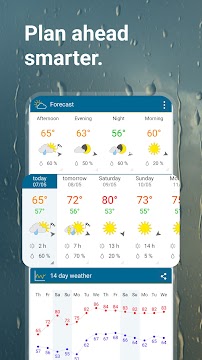
Around the radar sits a fairly broad set of forecasts. There is a 14-day outlook alongside daily forecasts, which is the range most people need for road trips, vacations, camping or a game day. Beyond the headline numbers, the app reports temperature, air pressure, wind speed and direction, humidity, rainfall amounts and hours of sunshine, so you can dig into detail when a plan depends on it.
Several of the extras are aimed at specific interests. The UV index and air quality index give a sense of how sun exposure and pollution might affect your day, and the lightning tracker is there for storm season. A weather widget can put local conditions, the current temperature and the daily forecast on your home screen, which is the least effortful way to keep an eye on things.
There is also material for people who follow weather as a hobby rather than a chore: webcams, sea and lake temperatures where the app reports them, the phases of the moon, and mountain conditions with snow forecasts and slope data for popular US ski regions. Users can record and share videos of interesting weather with the app's community, which is a nice touch for anyone who enjoys documenting a good storm.
For driving, the app reports conditions at your current spot, on the way and once you arrive, and it works with Android Auto for compatible users. That combination is genuinely useful on a long highway trip where the weather at the far end matters more than the weather outside your window.
Alerts, and what they cost you
Weather & Radar watches conditions in your area and sends alerts when something changes in a way that affects your day. The list includes severe storms, thunderstorms, the first snow, extreme heat and strong wind. The developer is careful to pitch these as sober updates written by meteorologists rather than dramatic warnings, which is the right tone for something that may arrive on your lock screen at an inconvenient moment.
The app is free to download, and it carries advertising and offers in-app purchases.
The other consideration is more fundamental: a radar app is only as good as its connection. Live layers that update in real time need data coming in, and the map is the part of the app that depends on it most. On a trip through an area with patchy coverage, expect the forecast text to hold up better than the animation.
Getting the most out of it day to day
My advice is to set the widget up early, and to save the deeper radar view for the moments when a decision actually hinges on timing.
When you do open the map, use the time controls rather than the current frame. The value of a radar is in the movement, not the snapshot, so stepping forward through the next few hours is how you judge whether a band of rain will reach you or slide past. The minute-by-minute view is the right tool for short windows; the four-day radar and the 14-day forecast are for planning further out.
It also pays to think about what you want from the alerts. If you spend time outdoors for work or sport, the storm, wind and heat warnings are the ones that will matter most. Skiers and hikers have their own sections to check before heading out, and anyone traveling can look at conditions along the route rather than just at home.
The app leans on a community element as well, with user-recorded weather videos. That is optional, but it is a reminder that this is a weather service with a broad audience, from people who just want to know whether to take an umbrella to enthusiasts who follow every front.
A dependable choice for planning around the sky
Weather & Radar earns its install count by keeping one clear promise: put the weather on a single map and let you read it quickly. The combination of a live radar, a 14-day forecast, detailed observations, air quality and UV data, and severe weather alerts covers most of what an ordinary person needs from a weather app, with webcams, ski data and community videos as extras for the keen.
The caveats are the ones that come with a free app. The developer's alerts are pitched as calm and factual, which I take as a deliberate contrast to apps that shout; whether that suits you depends on how you like to be warned.
If you plan outdoor time, travel regularly, or simply want to know whether the afternoon will hold, this is a sensible app to install and keep. The widget and the radar map are the two features I would lean on most. For anyone who wants a weather app that answers the question at a glance rather than burying it, Weather & Radar is an easy recommendation.
The short verdict
A free, widely used weather app whose single radar map makes checking the sky quick and clear.
What's new
We've further improved the accuracy of thunderstorm warnings.
App specs
- VersionVaries with device
- UpdatedSeptember 25, 2026
- Downloads100M+
- RequiresAndroid 10+
- PriceFree
- Age ratingEveryone
Weather & Radar Forecast: frequently asked questions
What does the WeatherRadar map show?
It combines rain, clouds, sun, lightning, fog and temperature on one view, so you can see how each is developing rather than switching between screens. The map covers current conditions, the next few hours and up to four days ahead. Short-term change is shown minute by minute.
Is Weather & Radar free to use?
It is free to download, and it carries advertising and offers in-app purchases.
What kind of weather alerts does it send?
The app monitors conditions in your area and sends alerts for severe storms, thunderstorms, the first snow, extreme heat, strong wind and other significant changes. These are presented as clear updates from meteorologists rather than alarmist warnings. The most recent update focused on improving thunderstorm warning accuracy.
Does it work while I am traveling or driving?
Yes. The app reports conditions at your current spot, on the way and once you arrive, which is useful for commutes, road trips and snow days. It also works with Android Auto for compatible users, so weather information can be viewed on the road.
What extra data does the app provide beyond the forecast?
Alongside temperature and rainfall, it reports air pressure, wind speed and direction, humidity, hours of sunshine, the UV index and the air quality index. There are also webcams, sea and lake temperatures where the app reports them, the phases of the moon, and mountain conditions with snow forecasts and slope data for popular US ski regions.
Pros
- One map for rain, sun, lightning and fog
- 14-day forecast plus detailed observations
- Severe weather alerts written by meteorologists
- Widget and Android Auto support
- Extras like webcams, AQI and ski data
Cons
- Free version includes ads
- In-app purchases are offered
- Live radar needs a data connection
Download Weather & Radar Forecast
by WetterOnline
Free · In-app purchases · Contains ads · Official store listings


