Latin Chords (LaCuerda PRO)
Entertainment · LaCuerda

Latin Chords (LaCuerda PRO) screenshots


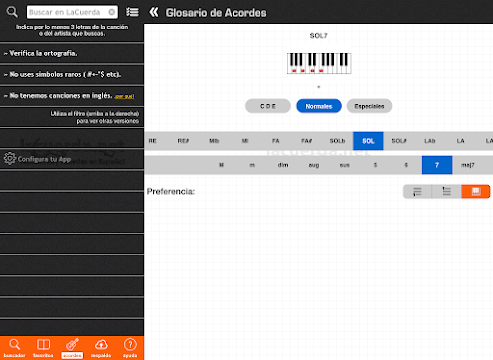

If you play guitar and most of the songs you want to learn come from Spain, the United States or Latin America, this app is built for you. Latin Chords is a paid Android app that connects to LaCuerda.net, a Spanish-language archive the developer describes as the largest of its kind, and it hands you the chords and tabs without going through a browser.
The pitch is straightforward. You get a catalog of more than 100,000 songs, chord diagrams for guitar and piano, and tools for playing along rather than just reading. The app costs $2.99 up front, carries no ads and offers no in-app purchases, so nothing interrupts a song once you are inside it.
It has been on Google Play since December 2010 and sits at a 4.6 average from 4,416 ratings, with more than 100,000 installs. That is a long run for a niche music utility, and it suggests the archive and the app have stayed useful to the people who need exactly this.
A Spanish-language songbook in your pocket
The core of the app is the archive itself. LaCuerda.net holds tabs and chords for Spanish-language music, and the app gives you direct access to it rather than making you hunt through a mobile browser. The developer counts more than 100,000 songs, drawn from artists in Spain, the United States and Latin America, which is a wide net for anyone whose playlist leans toward Spanish rock, pop or folk.
What you get on screen is the song in a form you can play from: lyrics with chords placed above them, the way a tab sheet works. That format matters for a guitarist who wants to strum and sing rather than read standard notation, and it is the reason an archive like this stays popular.
The app has been tuned for both phones and tablets, so the same song sheet can sit on a music stand or in your hand. For a rehearsal or a gathering where someone calls out a song, having the chords ready in that shape is the whole point.
Chord diagrams and key changes
Two features go beyond simply displaying a song. The first is chord diagrams, available for guitar and piano. If you are learning a chord you do not know, the diagram shows you where to put your fingers instead of leaving you to work it out from the name.
The second is chord translation. You can move a song into a key that fits your voice, and you can switch the notation between Do, Re, Mi and C, D, E. That second option is a small thing that matters a lot depending on how you learned music: someone trained with solfège names reads a sheet differently from someone who thinks in letters, and the app lets each of them see the version they understand.
Together these turn the archive from a reference into something you can adapt. A song written for a higher voice can be brought down, and a chord you have never played can be checked on the spot. For a guitarist who sings, that is the difference between a sheet you can use and one you have to transpose by hand.
Playing along, offline and on a server
Auto-scroll is the feature that makes the app usable while your hands are on the instrument. Instead of reaching over to move the page, you let the sheet scroll at a pace you set and keep playing. Anyone who has tried to balance a phone on a knee while holding a chord will see the appeal.
Offline access is the other one that changes how the app fits into a routine. Songs you have saved can be opened even in airplane mode, according to the developer, which means a practice session on a plane, in a basement with no signal or anywhere else without a connection does not depend on the network. That is a meaningful promise for an app whose content otherwise lives on a remote archive.
The favorites list is backed up remotely, so you can store it on the developer's servers and pull it back later. If you switch phones or reinstall, the list you built up does not have to be rebuilt from memory. There are also share buttons for email, Facebook and Twitter, and printing through Google Cloud Print, which covers the case where you want the song printed out rather than on a screen.
The most recent update, from November 2023, is described as bug corrections and updates to modules and libraries for stability. Nothing new was added; the work went into keeping the app running cleanly.
What the app asks of you
The price is the first thing to weigh. This is a $2.99 paid app rather than a free one with ads, and there are no in-app purchases to consider. You decide once, at the store, whether a Spanish-language tab archive is worth the money to you. For someone who plays this repertoire regularly, that is a modest one-time cost; for someone who picks up a guitar a few times a year, it is a purchase to think about.
The second consideration is the catalog itself. The archive is Spanish-language, and that is its focus. If the songs you want to play are in Spanish, the app is aimed at you. If they are not, the catalog will not have much to offer, and no amount of chord diagrams or auto-scroll changes that. This is a specialized tool, and it works best for the player whose music matches it.
The third is the print feature. Printing runs through Google Cloud Print, so anyone who wants paper copies should not assume the path is as simple as tapping a button. The rest of the app works on the device itself, and the offline mode covers saved songs when there is no connection.
None of this is a flaw in the design so much as the shape of the product. It is a paid, focused archive for Spanish-language music, and it does that job without ads or extra purchases in the way.
The player this fits
The clearest match is a guitarist who sings Spanish-language songs and wants the chords in front of them without juggling a browser. If you already know LaCuerda.net and use it on a computer, having the same archive in an app with offline access and auto-scroll is the natural next step.
It also suits a pianist who works from chord symbols rather than full scores, since the diagrams cover piano as well as guitar, and the key translation works the same way for both. A teacher or group leader who needs to move a song into a comfortable key on the spot would find that useful too.
What it is not is a general-purpose music app for every style. The catalog is Spanish-language, and the tools are built around chords and tabs rather than notation, lessons or backing tracks. If that describes the music you play, the app is a direct fit; if it does not, the catalog is the deciding factor, and it is worth checking that the songs you want are there before you pay.
A focused archive worth the price for the right player
Latin Chords does one thing and does it without clutter: it puts a large Spanish-language tab archive on your phone or tablet, with chord diagrams, key changes, auto-scroll, offline access to saved songs and a favorites list that lives on the developer's servers as well as on your device. The $2.99 price, the absence of ads and the absence of in-app purchases make it a clean proposition.
The case for it rests on the catalog. The recent update is maintenance rather than new features, which is what you would expect from a mature utility.
If you play Spanish-language music on guitar or piano and want the chords ready to play from, this is an easy recommendation. If your repertoire sits elsewhere, the archive is the reason to install, and it is the reason to hold off.
The short verdict
A paid, ad-free Spanish-language tab archive with offline access and playing tools, best for guitarists and pianists whose repertoire fits its catalog.
What's new
Bug corrections. Update of modules and libraries to increase stability.
App specs
- VersionVaries with device
- UpdatedNovember 21, 2023
- Downloads100K+
- RequiresVaries with device
- Price$2.99
- Age ratingEveryone
Latin Chords (LaCuerda PRO): frequently asked questions
Can I use Latin Chords without an internet connection?
Yes, for songs you have saved. The developer says the app includes offline access, so your favorites can be opened even in airplane mode. The archive itself lives online.
What does the chord translation feature do?
It lets you change the key of a song so it fits your voice, and it can switch the notation between Do, Re, Mi and C, D, E. That means you can read the chords in whichever naming system you learned. Both guitar and piano players can use it.
Does the app cost anything or show ads?
Latin Chords is a paid app at $2.99, with no ads and no in-app purchases. You pay once at the store and there is nothing further to buy inside the app.
Will I lose my favorites if I change phones?
No. The app includes remote backup, which stores your favorites list on the developer's servers so you can retrieve it later, covering a move to a new device or a reinstall.
Can I print songs from the app?
Yes, printing is handled through Google Cloud Print. The app provides print support, so a song can be sent to a printer rather than only read on screen. Anyone who wants paper copies should keep in mind that this route depends on that service.
Pros
- Over 100,000 Spanish-language songs
- Offline access to saved songs
- Chord diagrams for guitar and piano
- Auto-scroll while you play
- No ads and no in-app purchases
Cons
- Costs $2.99 up front
- Catalog limited to Spanish-language music
- Printing relies on Google Cloud Print
Download Latin Chords (LaCuerda PRO)
by LaCuerda
$2.99 · Official Google Play listing


