Cartoon Video & Gif Maker
Comics · Avatar Maker

Cartoon Video & Gif Maker screenshots


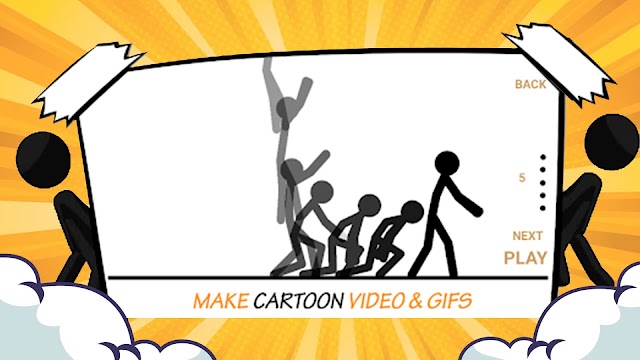


If you like the idea of answering a message with a small cartoon of your own making rather than a stock sticker, Cartoon Video & Gif Maker is built for exactly that. It is a free, ad-supported Android app from the developer Avatar Maker, sitting in the Comics category, and its stated purpose is to turn stick-figure drawings into animated GIFs and short videos you can post in chats or on a social feed.
The appeal is the combination of drawing and animating in one place. Rather than sketching a character in one tool and animating it in another, you work on the figure and the movement in the same app, then send the result out as a GIF or an MP4 file. For anyone who wants a personal reaction clip without learning animation software, that is a short path from idea to something shareable.
It has drawn a fair-sized audience: more than a million installs and a 4.0 average across 8,688 ratings, with the app first released in September 2017 and last updated in September 2023. Those numbers suggest a tool that people try and keep, though the average also suggests the experience is not flawless for everyone.
Drawing and animating in the same place
The developer describes the app as handling the whole job, from drawing characters through to producing the video or GIF. That matters because the usual friction in cartoon making is the handoff between the drawing stage and the animation stage, where a character has to be rebuilt or re-imported. Here the figure you draw is the figure you animate, and the output is a file you can pass along.
The characters in question are stick figures. This is not a tool for detailed illustration or for lifelike cartoon characters with shading and expression; it is a stickman cartoon maker, and the look of the output follows from that. If a simple, readable figure suits the message, the format is an advantage, because a stick figure reads clearly even at the small size a chat window gives it.
The workflow is deliberately undemanding: you draw, you set the figure moving, and you export.
The shortcut that makes animation quick
The feature the developer singles out is the way a stick is animated. Instead of positioning the figure step by step through a movement, you move a stick in one direction and the animation follows from there. The developer presents this as the difference between this app and others of its type, and it is the part that would decide whether the app feels fast or fiddly in practice.
For someone making a short reaction clip, that shortcut is the whole point. A wave, a walk or a small gesture can be set up without drawing every intermediate position, which keeps the job within the few minutes a chat reply allows. The trade-off is control: a shortcut that handles the movement for you is unlikely to give the frame-by-frame precision someone would want for a longer or more deliberate piece.
I would expect this to be the feature that either wins you over or does not. If the automatic movement matches the gesture you had in mind, the app is quick and pleasant; if you want a specific motion, the same shortcut may feel like a constraint. Either way, it is a clear design choice rather than an accident, and it fits the app's stated aim of making cartoon production an easy task.
What you can send, and where it goes
Finished work leaves the app in two formats: animated GIF and MP4 video. That pairing covers the places people actually share things. A GIF slots into a chat or a comment thread, while an MP4 is the safer choice for a status update or anywhere a video file is expected. Having both means one creation can serve more than one destination.
The developer frames the app around expression in conversation, giving examples such as saying you love someone or apologizing. That is a useful way to think about it. The strongest use case is a short, personal message that a plain sentence would not carry as well, delivered as a moving cartoon rather than words alone.
The app is also described as a way to share creative thoughts in cartoon style while chatting with friends or anyone else, and posting to a Facebook status is named as one destination. The audience is therefore social rather than professional: people who want something to send, not people producing a series.
What it asks of you
The app is free to install and supported by ads, and it does not offer in-app purchases. That keeps the cost of trying it at nothing, with the usual consequence that advertising is part of the experience. For a tool you might open for a couple of minutes at a time, that is a reasonable arrangement, though it is worth being aware of before you start.
The other requirement is willingness to draw. The app gives you the tools to make a character and set it moving, and the creative work is yours. Someone who wants a library of ready-made cartoons to browse and send will find this a different proposition from someone happy to sketch a stickman.
The stick-figure focus is the main limit on what you can produce, and judging it by the standard of a general illustration suite would miss what it is for.
Who gets the most from a stickman maker
The clearest fit is someone who chats a lot and wants reactions that are theirs rather than borrowed. Making a small cartoon to answer a message, mark an occasion or apologize with a bit of humor is precisely what the app is set up to do, and the GIF and MP4 export covers the usual ways of sending it.
It also suits people who have an idea for a character but no animation background. The one-direction movement shortcut removes the part that normally stops beginners, and the stick-figure style keeps the drawing itself manageable. Anyone who has wanted to make a short cartoon and been put off by the software involved is the natural audience here.
It is a less obvious choice for anyone producing polished artwork or longer animated pieces. The format, the automatic movement and the simple figures all point toward short, informal clips, and that is where the app is at its most useful.
A quick way to make your own reaction clips
Cartoon Video & Gif Maker does one job and does it in a way that is easy to start: draw a stick figure, set it moving with a single directional push, and export the result as a GIF or MP4. The free, ad-supported model with no in-app purchases makes trying it low-risk, and the million-plus installs and 4.0 average suggest plenty of people have found it worth keeping.
I would point it at chat users who want personal cartoon reactions and at beginners who want to animate something without learning a full animation tool. If your interest is detailed cartoon art or longer productions, the stick-figure approach and the simplified movement will feel narrow, and that is a fair reflection of what the app sets out to be.
For its intended use, it is a sensible install: quick, free, and aimed at a task that most people can finish in a few minutes.
The short verdict
A free, ad-supported stickman animator for quick cartoon GIFs and MP4 clips to send in chats.
App specs
- Version4.3
- UpdatedSeptember 2, 2023
- Downloads1M+
- RequiresAndroid 5.0+
- PriceFree
- Age ratingEveryone
Cartoon Video & Gif Maker: frequently asked questions
What can I make with Cartoon Video & Gif Maker?
The app is built around stick-figure cartoons that you draw and then animate. Finished creations can be exported as animated GIFs or as MP4 videos, so they can be sent in chats, posted to a social status or shared as a video file. The main use is expressing yourself in cartoon form while messaging.
Do I need drawing or animation experience?
The app is designed to keep the process simple, and the animation shortcut is the clearest example: you move a stick in one direction and the figure follows, rather than setting each step yourself. The drawing itself is still yours to do, so some willingness to sketch a stick figure helps. It is aimed at people who want a quick cartoon, not at trained animators.
Does it cost anything or include purchases?
It is free to download and does not offer in-app purchases, but it is supported by advertising, so you can expect ads to be part of using it.
How does the animation work compared with other cartoon tools?
The movement system is the app's distinguishing feature: instead of positioning the figure through every stage of a motion, you push a stick in one direction and the animation follows. That is what makes short clips quick to produce. The same automation means you have less control over the exact path of a movement.
What kind of cartoons does it produce?
The output is stick-figure animation, in the style of a stickman cartoon maker. Figures are simple and read clearly at small sizes, which suits chat reactions and short messages. It is a format for brief, informal clips rather than detailed illustration.
Pros
- Draw and animate in one app
- Exports both GIF and MP4
- One-direction movement speeds up animation
- Free with no in-app purchases
Cons
- Supported by ads
- Stick-figure style only
- You supply the drawing and idea
- Simplified movement limits fine control
Download Cartoon Video & Gif Maker
by Avatar Maker
Free · Contains ads · Official Google Play listing


